sexta-feira, 20 de abril de 2012

How Windows Phone 8 ‘Apollo’ Would Stack Up Against iOS 5, Android 4

Hands eagerly pawed all over Windows Phones at CES 2012. Photo: Jon Snyder/Wired.com
Microsoft’s Windows Phone OS is often criticized for lagging far behind iOS and Android, the other major operating systems in the mobile space. But on Thursday, a leaked description of Microsoft’s next big mobile OS, Windows Phone 8, came to light, revealing how the operating system will improve.
The leak, reported by blog Pocketnow and validated by Windows insider Paul Thurrott, shows that Apollo (the codename for Windows Phone 8) will be a major improvement over the current iteration, Windows Phone 7.5, otherwise known as Mango.
“Currently, we have to work around some limitations with Mango, and many of those limitations would be removed with the upcoming Apollo version,” Eric Setton, CTO of mobile VoIP app Tango, told Wired.
Mango is the current version of Windows Phone. It launched in October, bringing with it a slew of new features, including built-in social media and chatting tools, groups for organizing contacts, multitasking, and improved Live Tiles. A small update called Tango (not to be confused with the VoIP app) is slated next, and then the world will see Apollo, which is rumored to launch in mid-2012.
Microsoft wouldn’t tell us whether Thursday’s leak report is accurate, but offered insight on its OS plans in general.
“We think your smartphone should be smarter,” a Microsoft spokesperson told Wired. “When I take a picture, a ‘smart’ phone should anticipate that I may want to share it with a friend or on Facebook and help me easily do that. With Windows Phone these kinds of things are just built in, and we think there’s always room for a better way.”
A number of Windows Phone developers (several whom also write iOS and Android apps) were eager to share their thoughts on this rumored “better way.”

“I am very excited to hear that Microsoft is making a strong push to catch up to the iOS and Android platforms,” Sina Mobasser, co-founder of iOS and Windows 8 app BarMax said. “But while the specs that were leaked are certainly appetizing, they will not be enough.” Mobasser thinks Microsoft is still “holding a lot of cards close to its chest,” and we have to agree. But Thursday’s leak is still a tantalizing look at what Windows Phone could offer in the near future.
All of which begs the question: Is Windows Phone Apollo enough? If it were released right now, how would it measure up against its biggest competitors, iOS 5 and Android 4, aka Ice Cream Sandwich? Here’s our take on how it may fare in six key areas.

Hardware Support

Right now, Windows Phones are limited to single-core processors. They also lack support for removable storage. But Windows Phone Apollo will support multi-core processors, as well as microSD storage.
Because iOS devices do not include removable storage, Apollo would trump iOS there. But both the iPhone 4S, which was released in October 2011, and the iPad 2, released in March 2011, are dual-core devices that run Apple’s A5 processor. Apple’s next iPad is rumored to be built on a quad-core A6 processor, so it’s imperative for Microsoft that Windows Phone run multi-core processors, if only to remain modern and relevant.
Of course, Android began supporting multi-core devices as far back as Android 3.0 (Honeycomb) in February 2011. And pretty much every Android smartphone allows for SD or microSD storage. The Android OS has supported this feature for quite a long time.
“Hardware-wise, I’m not a big fan of what I call the ‘arms race’ because I think there is still a lot of room to optimize software to use hardware like GPUs more effectively,” Windows developer Kelly Sommer said via e-mail. Indeed, current Windows Phones don’t exhibit any major performance shortcomings, despite their specs handicap. But it never hurts performance — or public perception — to match industry-standard specs.
Apollo will also allow for more screen resolutions and device form factors than Mango currently does. “As a user, different screen resolutions and more powerful phones will help to sell more compelling hardware to better compete with iOS and Android,” Setton said.
Verdict: Apollo essentially reaches parity with iOS and Android in terms of hardware support, but doesn’t offer earth-shaking innovation.

Mobile Payments

Windows Phone Apollo will use NFC technology to facilitate mobile payments. With a swipe of your phone on a point-of-purchase RFID tag, you’ll be able to buy coffee, cigarettes, and sundry other consumables. Sound familiar? That’s what Google is doing — or is attempting to do — with its Google Wallet mobile payment platform.
Google Wallet is currently available on the Nexus S smartphone. Photo: Jon Snyder/Wired.com
Unlike Wallet, however, it looks like Microsoft’s version of NFC payments will play by carrier rules. According to the PocketNow report, “The ‘Wallet experience‘ “will have the capability to be carrier-branded and controlled.” This is a point of contention for Android’s Wallet feature. Google has been battling carriers like Verizon over whether Wallet will appear on upcoming Android 4 devices. Wallet, in fact, did not make an appearance on the latest flagship Android device, the Samsung Galaxy Nexus.
Carriers such as AT&T, T-Mobile and Verizon want a piece of the mobile-payment pie through their own version of Wallet, dubbed Isis. This leaves Sprint as the only U.S. carrier that currently offers Google Wallet. And it also opens up a huge window of opportunity for Windows Phone to take charge in the mobile payments arena.
Developers could also take advantage of the technology, if the API is exposed. “Developers can leverage that to create some brand-new experiences for smartphone users,” Sommers said.
Although many people expected — hoped? hypothesized? — that Apple’s 2011 iPhone, the 4S, would include NFC, Apple hasn’t yet adopted the burgeoning technology.
Verdict: When it comes to mobile payments and NFC, Apollo is ahead of Apple’s current curve, though this could change if the iPhone 5 supports NFC in a big way. As for Android, Apollo’s NFC support might actually trump Android’s, if only because it would receive carrier blessings.

Desktop Integration

Windows Phone 8 Apollo will offer “companion” experiences with its desktop counterpart, Windows 8, which is also set to launch mid-year. Right now, Apple’s Mac OS and iOS are completely separate code bases and platforms. The upshot? Apollo could offer an unprecedented level of what we’ll call “pan-OS unification.”
One of the most interesting elements of OS unification is how it will be implemented: Windows Phone 8 will use the core system from Windows 8. Specifically, the updated OS will be based on the NT kernel rather than the Windows CE kernel, which is currently employed in Windows Phone (the kernel is the core layer of any OS — the interface between hardware components and applications that run on the device). In short, Windows Phone 8 will be very closely related to Windows 8, even to the level where desktop apps could be more easily ported to simplified phone versions.
Geeky kernel discussions aside, Microsoft plans to make user-experience models very similar across its desktop, mobile and Xbox platforms. Syncing information and content sharing across these three platforms will be made easier, as well.
In the world of Google, a deliberate focus on product compatibility helps keeps user data synced across Android phones and tablets, desktop web browsers, and Chromebooks. That said, Google doesn’t have a desktop OS the way Microsoft does (and, no, we won’t count Chrome). What’s more, the Google user experience is very different between mobile and web, from smartphone to tablet, and even from smartphone to smartphone, due to fragmented OS versions and rampant OEM and carrier UI skinning.
In iOS land, the interface is essentially consistent across iPhones and iPads. But the Mac OS desktop interface, of course, despite a bit of window dressing, is a completely separate experience, both in terms of UI and cross-platform app compatibility. As for cloud support, the iOS iCloud ensures your data and apps are synced across devices. In Windows Phone Apollo, SkyDrive will do the same.
Verdict: Awesome sauce! Apollo looks to offer a heretofore unseen level of integration between Microsoft’s desktop and smartphone products.

App Ecosystem

Microsoft plans to have at least 100,000 apps in its app market by the time Windows Phone 8 debuts later this year.

That’s all? By Apple’s latest counts, there are more than 550,000 apps in the iOS App Store. And according to the unofficial count from AndroLib, the Android Market has more than 750,000 apps at the moment.
Microsoft is working hard to offer incentives such as funding, guidance, and marketing opportunities to attract developers to its mobile platform. Windows Phone is currently the fastest-growing mobile app platform and just crossed the 50,000 app mark in late 2011. But it’s still got a long, long way to go before its offerings are on the same level as iOS and Android.
And let’s not forget that Windows Phone 8 will allow for native code support, which means devs can easily port apps they’ve already written for another platform to Windows Phone. This is definitely something developers are excited about.
“The vast majority of mobile app developers have built apps for iOS or Android,” Mobasser said. “We hope the porting of code is well thought-out and allows us to smoothly transition our app to Windows Phone without having to deal with a number of compatibility issues and bugs.”
Windows Phone 8 will also allow for app-to-app communications, something both iOS and Android already offer. “App-to-app communication can create some really interesting user experiences between applications,” Sommers said.
Windows Phone Mango’s Yelp-like Scout feature, which helps find local restaurants, businesses, and activities based on their proximity and rating, will get personal recommendations added to its list of functions. This is something the Foodspotting app just added to its repertoire as well.
Apollo should also feature its own Skype app, or have Skype baked right into the OS — the exact implementation isn’t quite clear from the leaks. Skype is already available on iOS and Android, if you’re keeping score.
Finally, for its camera app, Apollo will include new “lens apps” for more powerful smartphone image-capture abilities. Now, there are plenty of third-party photography apps already available on iOS and Android. And many Android phones currently have robust filters and scene options built in to their native camera apps. So while the Apollo camera update looks promising, it may not offer much of anything new to the smartphone scene.
Verdict: Windows Phone is still playing a serious game of catch-up in the apps arena. But sharing a code base with Windows desktop, along with native code support, will certainly help Microsoft’s app-related fortunes.

Data Management

Apollo will use a tool called “DataSmart” to make sure you’re able to easily track your monthly data usage. Available as a Live Tile that you can pin to your home screen, it will break down your data usage (helping you make smarter decisions about what you download) and give Wi-Fi networks — even carrier-operated Wi-Fi hotspots — precedence over cellular data connections whenever possible.
In iOS 5, you can track your cellular usage, but it’s buried inside the General settings menu. Yes, there are indeed a number of third-party iOS apps you can download that do the trick, but these features should really be exposed directly in the OS — like they are in Android.
Data management is better than ever with the advent of Android 4, aka Ice Cream Sandwich. The built-in Data Usage app provides numerous charts and graphs that reveal your data-gobbling habits, and you can even set governors and alerts to help you control data usage. Android sets the new standard for data management, so while Windows Phone’s solution sounds helpful, it will have a long way to go in matching Android’s approach.
Verdict: We’ll see. We’ll see. But if nothing else, Microsoft is moving in the right direction.

Enterprise

Apple CEO Tim Cook pointed out that iPhones and iPads are rapidly being adopted in the enterprise environment.
To grab a piece of that market (many members of which are in search of new handsets now that BlackBerry fever is fading), Windows Phone 8 will offer the same native BitLocker encryption as Windows 8. That’s 128-bit, full-disk encryption. This could be good news for potential switchers, as built-in encryption in iOS devices reportedly has some security flaws. For Windows Phone 8, companies will also be able to create personalized, proprietary software for their employees, which Windows 8 will allow as well.
Now, does anyone besides developers use Android for enterprise applications? I kid — sort of. Google also offers storage encryption, as well as third-party encryption solutions.
Verdict: It looks like Microsoft will be ahead of the curve. And it should be. This is a Windows product, after all. If Microsoft can’t appeal to the mobile enterprise crowd, it’s got problems.

So What’s It All Mean?

Windows Phone Apollo looks like it will address a number of the issues currently holding back the OS from equal footing with its peers. But there are still a few areas that need improvement. “I think the biggest gaps are still software and design,” Sommers said. “Microsoft needs to be obsessed with paying attention to detail in its user experiences.”
This is an area that Android addressed in its Ice Cream Sandwich update in late 2011, and an area where Apple absolutely excels.
Based on the information that was leaked, Windows Phone 8 should achieve essential feature parity with its competitors — assuming no significant improvements are made to iOS or Android by the time Apollo arrives. And if the leaked info is merely a tease of what Apollo has in store — a mere subset of greater feature riches — then Windows Phone 8 will be quite compelling indeed.

Windows Phone 8 'Apollo' Should Be Windows RT

Microsoft has a lot going on in 2012 with a variety of major products and platform rollouts. Windows 8 and the accompanying Windows RT are expected to launch this fall, and many suspect that Microsoft will also introduce Windows Phone 8 around the same time. Instead of making Windows Phone 8 available, though, Microsoft should move its smartphones to Windows RT.
 
Windows 8
There has been a tremendous amount of chaos and confusion lately about Windows Phone 8 and what it means for existing Windows Phone customers. Will current Windows Phone models like the recently launched Nokia Lumia 900 be upgraded to the new version? There are mixed reports, and the answer seems to be leaning toward “no”.
Microsoft will be shooting itself in the foot…with a shotgun. It’s bad enough that Android users with cutting edge smartphones or tablets often have to wait months to get the latest update. But, at least most eventually get it. It’s not good practice to sell “cutting edge” hardware that is obsolete before it’s unboxed.
It may not change the reality of whether or not existing Windows Phone smartphones get upgraded, but Microsoft could remove some of the confusion and build a stronger mobile platform in general if it got rid of Windows Phone altogether. Just move Windows Phone devices to Windows RT.
There are differences in features and capabilities between an iPhone and an iPad--but they both run iOS. There are differences in features and capabilities between a Samsung Galaxy Nexus smartphone and a Samsung Galaxy Tab tablet--but they both run Android.
As it stands now, Microsoft smartphones will ostensibly run Windows Phone 8, and Microsoft tablets will run Windows RT. But, both are variations of a Microsoft Windows theme using a Metro interface, and designed to run on ARM-based hardware architecture. Why bother developing and maintaining both?
Onuora Amobi, editor of Windows8Update, agrees that consolidating Windows RT with the upcoming Windows Phone 8 “Apollo” OS makes sense in theory. However, Amobi thinks it’s a Herculean strategic shift that Microsoft isn’t prepared for. “I have to assume that a successful dual OS (RT and Apollo) would require a lot of internal reorganization within the Microsoft Windows development team structure. I don't see any signs of that happening anytime soon.”
Wes Miller from Directions On Microsoft, says that it has been widely predicted that Windows Phone 8 will switch from Windows CE to the Windows NT kernel. He points out some tactical hurdles Microsoft might face trying to consolidate Windows Phone with Windows RT, though. For example, Metro on Windows Phone is strictly portrait, while Metro on Windows RT is strictly landscape. Also, Microsoft has announced that Windows RT will include versions of the key Microsoft Office apps, but the smaller display on a smartphone is too small to run those adequately.
Miller is correct. But those are the same sort of differences in features and capabilities that exist between iOS and Android smartphones and tablets. There are better ways to handle the variations in hardware capabilities than creating entirely separate mobile platforms for each.
Maintaining both Windows RT and Windows Phone 8 simultaneously seems like a redundant waste of resources for Microsoft, a burden for developers to create separate apps for both platforms, and a confusing disconnect for users that could hinder the success Microsoft smartphones and tablets.

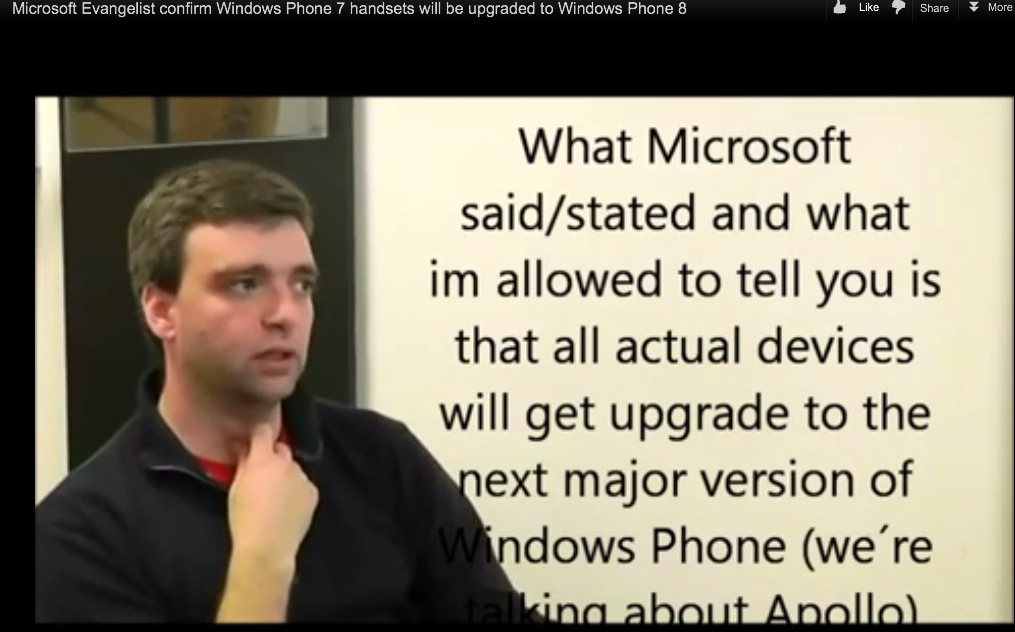
Windows Phone 8 (Apollo) going on EVERY WP phone


One of the newer concerns that seemed to stack up against Nokia’s Lumia phones was – could it get the new update, WP8? For a long while it was assumed it would be the case, but recently there was a growing worry that it would not.
This uncertainty has led to some sites not recommending the Lumia at all despite liking the phone. Does it have the longevity of updates? Now some people are also of the opinion that when buying a phone, you should think about whether you’re happy with it as it is, or you’re actually hoping for something else in the future.
Engadget are reporting that WP8 (Apollo) is now supposedly going to all WP phones. Erm, Hurrah? Either way, updates would still come to the phones with features still being updated. The source is a ‘Microsoft Evangelist’. Does that mean simply a fan? Surur says according to his Linkedin, he works at MS. Is Evangelist Developer an actual job title?
http://www.linkedin.com/pub/nuno-silva/a/a37/358

Source: WMPoweruser via Engadget

segunda-feira, 16 de abril de 2012

Flash Custom Windows Phone 7 ROMs To Your HTC 7 Mozart [How To Guide]

If you think that custom ROMs are a cool feature that are exclusive to Android, then think again. Windows Phone 7 users have a choice too. You just need to have a developer unlocked device, and a sound knowledge to look in the right places. If you have an HTC 7 Mozart for instance, you have quite a lot to choose from in terms of ROMs। But how can you flash a ROM to a device as uptight about security as a Mozart? There’s a way for it and if you want to know, read on.

Flash Custom Windows Phone 7 ROMs To Your HTC 7 Mozart [How To Guide]

HTC 7 MozartIf you think that custom ROMs are a cool feature that are exclusive to Android, then think again. Windows Phone 7 users have a choice too. You just need to have a developer unlocked device, and a sound knowledge to look in the right places. If you have an HTC 7 Mozart for instance, you have quite a lot to choose from in terms of ROMs. But how can you flash a ROM to a device as uptight about security as a Mozart? There’s a way for it and if you want to know, read on.

Disclaimer: Please follow this guide at your own risk. AddictiveTips will not be liable if your device gets damaged or bricked during the process.
The method has been worked out by recognized XDA developer, Casey_boy. Following are the requirements and instructions to achieve this.
Requirements:
  1. Your Mozart needs to have enough battery left to go through with the entire process (around 60%)
  2. Head over to this link and look for the ROM of your choice. Once you have decided which ROM you want, download it to your system.
  3. Go to the download link given at the end of the post and grab the driver appropriate for your PC’s OS.
Instrcutions:
  1. Switch off your mobile.
  2. Press and hold the Volume down button, combined with the Power button. This should put your device n boot loader mode.
  3. Connect your device to the PC via USB cable. This will open up your phone in USB mode.
  4. Now go to the ROM file you downloaded to your PC. Unzip it.
  5. Run the exe file the unzipped archive will give you.
  6. Update your device as requested.
  7. All that’s left to do now is to set up your ROM the way you want as the previous step will automatically flash it to your phone.
Download for Windows XP
Download for Windows Vista/7
[via XDA Forum]

domingo, 15 de abril de 2012

Duqu Trojan uses 'unknown programming language'

Kaspersky: Duqu Trojan uses 'unknown programming language'

By | March 8, 2012, 3:45pm PST
Summary: Security firm Kaspersky says the Duqu Trojan was partly written in a programming language it does not recognize. The company is asking the programming community for help to identify the code.
Update: Duqu Trojan programming language identified

The Duqu Trojan, referred to by some as Stuxnet 2.0, was partly written using an unknown programming language. The payload DLL, which communicates exclusively with the Command and Control (C&C) server so that the worm knows what to do once it has infected a system, has code that doesn’t resemble anything seen before. While security researchers have worked out what the mystery code does, they aren’t sure about the syntax.
Some parts of it, including those for downloading and executing additional modules, were written in standard C++, but a big chunk of it was not. This particular section contains no references to any standard or user-written C++ functions, and may have been created by a different programming team. Security firm Kaspersky says the unusual code is unique to Duqu: many parts are directly borrowed from Stuxnet, but this one is new. The company has named it the Duqu Framework, and has noted that it is not written in C++, Objective C, Java, Python, Ada, Lua, and many other languages it checked. Unlike the rest of Duqu, it also wasn’t compiled with Microsoft’s Visual C++ 2008. All we know is that it’s object-oriented.
The sophistication of the worm is one thing, but the fact that an entirely new programming language may have been created for it, points to some seriously deep pockets backing the project. Security experts have suggested that a state must have been involved in its development, and Kaspersky CEO Eugene Kaspersky supports this speculation on Twitter:
The mystery of #Duqu framework http://bit.ly/w5BrzP
Here is what Kaspersky was able to conclude in its analysis:
  • The Duqu Framework appears to have been written in an unknown programming language.
  • Unlike the rest of the Duqu body, it’s not C++ and it’s not compiled with Microsoft’s Visual C++ 2008.
  • The highly event driven architecture points to code which was designed to be used in pretty much any kind of conditions, including asynchronous commutations.
  • Given the size of the Duqu project, it is possible that another team was responsible for the framework than the team which created the drivers and wrote the system infection and exploits.
  • The mysterious programming language is definitively NOT C++, Objective C, Java, Python, Ada, Lua and many other languages we have checked.
  • Compared to Stuxnet (entirely written in MSVC++), this is one of the defining particularities of the Duqu framework.
“After having performed countless hours of analysis, we are 100% confident that the Duqu Framework was not programmed with Visual C++,” writes Kaspersky Lab Expert Igor Soumenkov. “It is possible that its authors used an in-house framework to generate intermediary C code, or they used another completely different programming language. We would like to make an appeal to the programming community and ask anyone who recognizes the framework, toolkit or the programming language that can generate similar code constructions, to contact us or drop us a comment in this blogpost. We are confident that with your help we can solve this deep mystery in the Duqu story.”
The blog post from Kaspersky Lab is already filled with comments guessing at the possible programming language used. Check them out for yourself: The Mystery of the Duqu Framework. One comment from user As400tech, who registered his account with Kaspersky Lab today, looks particularly promising:
That code looks familiar
The code your referring to .. the unknown c++ looks like the older IBM compilers found in OS400 SYS38 and the oldest sys36.
The C++ code was used to write the tcp/ip stack for the operating system and all of the communications. The protocols used were the following x.21(async) all modes, Sync SDLC, x.25 Vbiss5 10 15 and 25. CICS. RSR232. This was a very small and powerful communications framework. The IBM system 36 had only 300MB hard drive and one megabyte of memory,the operating system came on diskettes.
This would be very useful in this virus. It can track and monitor all types of communications. It can connect to everything and anything.
Duqu was first detected in September 2011, but Kaspersky Lab believes it has seen the first pieces of Duqu-related malware dating back to August 2007. The Russian security firm also notes Duqu, like Stuxnet before it, is highly targeted and related to Iran’s nuclear program.
Update: Duqu Trojan programming language identified

Experience Windows 8 Metro UI on iPad with Splashtop


Goldcard SPL Downgrade Method; No Android-Phone and/or custom wires!

Goldcard SPL Downgrade Method; No Android-Phone and/or custom wires!

Good Evening,

I'd like to show you the easiest and noob-friendliest way to downgrade spl via Goldcard in order to install hspl and custom roms.

FAQ:

1) Q. What is a GoldCard? A) A specially formatted SDCard used to flash a stock rom to a phone when normal flashing methods do not work.
2) Q. Why would I need to make a GoldCard? A) To downgrade your SPL when you are unable to flash an SPL downgrade using other methods, or when your bootloader becomes "halfbricked" and will not allow you to flash using a PC and a USB cable.

What's so special about this guide?

- no custom wires needed
- no android/win-mobile needed
- all files included


The point why I wrote this guide is, that the previous guides often included unnecessary steps, they were sometimes inconsistent between each other, not very detailed, you needed to build yourself custom wires, and manually find the necessary files yourself. Here's an easy one.

What you need:

- Micro SD Card
- MicroSD Card reader
- Y-Cable USB
- USB Gender Changer

Files to download:

- Goldcard-tool

- My custom goldcard.img

- Your device-specific .nbh image.
You need to download a nodo rom for your device and extract Ruu_signed.nbh via Winrar. Rename it to


-Sparimg.nbh for Spark (Trophy)
Rom-download: http://forum.xda-developers.com/show....php?t=1427904
-Spawimg.nbh for Verizon/CDMA Spark
Rom-download: http://forum.xda-developers.com/show....php?t=1427904
-SCHUIMG.nbh for Schubert (HD 7)
Rom-download: http://forum.xda-developers.com/show....php?t=1427890
-MOZAIMG.nbh for Mozart
Rom-download: http://forum.xda-developers.com/show....php?t=1427893
(Feel free to add more Devices in the comment section.)


So let's start:

  1. Make sure you're battery is above 50%
  2. Format the MicroSD Card to fat32
  3. Copy the .nbh Image to the MicroSD Card
  4. Launch Goldcard Tool
  5. While ignoring the cid box, choose "Load GoldCard.img" and select the goldcard.img you just downloaded
  6. Press "Patch MMC" and wait for confirmation
  7. Unplug the MicroSD Card
  8. Connect the Y-Cable and the USB-gender-changer like shown in the picture
  9. Connect the MicroSD-Card
  10. Connect your phone
  11. Connect the y-cable to an ordinary usb port
  12. Hold Power+Camera+VolumeDown until the USB Host Mode appears
  13. Wait about 30 min until the update completes. The phone may reboot a couple of times.
  14. After the update completed, unplug your phone and reboot
Now your spl should be downgraded. I hope I could help you out.

Cheers, Klaus.


I do not take responsibility for any possible damage caused.

Credits for further research to

Kr3i0s http://forum.xda-developers.com/show....php?t=1371073
sh4d0w86 http://forum.xda-developers.com/show...&postcount=286
xboxmod http://forum.xda-developers.com/show...php?p=10176994
Nullstring http://forum.xda-developers.com/show....php?t=1429318

SMSBackup V0.7, Extract SMS From Store.vol Directly

SMSBackup V0.7, Extract SMS From Store.vol Directly

[Introduction]

Thunder_ in XDA have found that windows phone itself has a backup mechanism, it may backup messages on a regular basis, and store it at "\Application Data\Microsoft\Outlook\BackupVols\CommsBackup.xml" (see this link), so we can take the file, extract it and then we get our messages. Before version 0.7, the app automatically copy the "CommsBackup.xml" to IsolateStorage and extract them to readable sms.

Since CommsBackup.xml is generated by the system, we can not controll it. We often can not get all of our sms because CommsBackup.xml does not contain newest messages.

The sms(also many other datas) in Windows Phone actually stored at "\Application Data\Microsoft\Outlook\Stores\DeviceStore\store.vo l". It is an EDB database. We can use native EDB API to explorer and read it. Version 0.7 of the app use this way to extract our sms. Then sms backup will never rely on CommsBackup.xml anymore

The app should be compatible with first-generation interop-unlocked HTC, Samsung phones. Also support fully-unlocked phones.

Thanks to GoodDayToDie, he gave a very clear statement which phone should work and which won't work

Samsung gen1: Should work.
Samsung gen2: Won't work. The gen2 drivers have some limitation and can't currently be used for homebrew.
LG: Won't work. The LG provxml driver cant be used for FileOperation.
HTC gen1 no updates (or "fully unlocked" custom ROM): Should work.
HTC gen1 with some updates: Might work, may depend on how the provxml is built.
HTC gen1 with full updates: Won't work.

HTC gen2, Dell, Nokia, and Toshiba/Fujitsu won't be supported until we have interop-unlock, at the earliest.
[Features]

1. Automatically extract sms in store.vol, can sort messages by conversation or by sending time, can filter messages by contact, start/end date and keyword.
2. Export sms in both xml or txt format to either IsolateStorage or SkyDrive
if you export sms to IsolateStorage, the exported file is export_sms.txt/export_sms.xml, you can use any IsolateStorage tools to download them to your computer.(The ID of this app is 09125ea9-95de-469a-aedc-22e35389ab0a);
if you export sms to SkyDrive, the sms will upload to your SMS folder in SkyDrive(The folder is private, thus "just me")
3. Backup and restore "store.vol" and "PimIndex.vol", you can backup these two files before you flashing ROM and restore it later. This will keep your SMS and contacts remain the same.(This feature is for professional users only)

[Tutorial - How to backup and restore your sms]

The sms and contacts information(also many other datas) actually stored at "\Application Data\Microsoft\Outlook\Stores\DeviceStore\store.vo l". To backup and restore this file will keep our text messages remain the same. Also, there is a file in the same folder named PimIndex.vol which contains contacts' indexes. WP use it to search contacts. So you must also backup and restore this file.

Below is the methods:
1. Open SMSBackup app(version>=0.6), go to "Export & Backup" page, navigate to "Backup", there are two buttons for backup and two buttons for restore.
2. Click "Backup store.vol" button to backup "store.vol", then the file will be copied to "BackupVols/store.vol" in IsolateStorage, you can use any IsolateStorage tool to download it to your computer(the same with PimIndex.vol).
3. When you need to restore sms and contacts(for example, after flashing a new ROM), you find the store.vol and PimIndex.vol you have already backup in your computer, use IsolateStorage tool to upload the two files to BackupVols folder.
4. Open SMSBackup app and navigate to the same page in step 1. Click "Restore store.vol" button, then click "Restore PimIndex.vol". When both have executed. Restart your phone immediately.
Important Note(Updated 25/2/2012): If you flash a new ROM, please add/sync live account first and then restore store.vol and PimIndex.vol; After restoring, sync again. If you failed in this way, you can restore store.vol and PimIndex.vol first and then add/sync live account. Since we do not know how WP manage accounts and other infos, so different problems may happen after restoring. Feedbacks and suggestions on restoring feature are welcome.

Important Note: the restore feature in version 0.5 is not perfect. It can restore all text messages and contacts successfully. But you may encounter the problem with searching contacts or wrong profile pictures in the People Hub. Thanks to the feedbacks by kahiro, 2new, AshleyT. The reason is that we haven't backup and restore PimIndex.vol. Now I'm researching on how WP store contact's index. I think we can modify this file to add indexes by ourselves. every contact is a 12 bytes in PimIndex.vol. I don't know what it means. If you can help me, please open SMSBackup V0.6, Click "test" in the menu bar to navigate to a new page, then click "Get Contact Index Format" button and reply the format string it shows(for example 01-00-00-00-02-00-07-00-8E-00-00-00). Thanks!

[Versions]

What's new in V0.7
1. Extract sms from store.vol directly, now you can backup and export all short messages and will never rely on CommsBackup.xml.
2. Optimize for fully-unlocked ROMs. If your phone is fully-unlocked, the app read store.vol directly; If your phone is interop-unlocked but not fully-unlocked, the app will copy store.vol to IsolateStorage and then read store.vol(because directly mount store.vol will cause Access Denied exception)
3. Add more setting options and remove exit confirm.
What's new in V0.6
1. Add support to backup and restore both store.vol and PimIndex.vol.
2. Increase max waiting time for file operation to 15 seconds(older version is 6 seconds). This may help those who have very big CommsBackup.xml or store.vol(>10MB)
3. In order to find how WP store contact's index in PimIndex.vol, I add a test feature(Click "test" in the menu bar) and need your feedbacks. Thanks!
What's new in V0.5
1. Add feature to export filtered messages. You can enable this in setting page.
2. Simplify setting page, no "save" button now.
3. Fix a bug in V0.4 which may show "import error: Value Does not fall within the expected range" when the app starts.
What's new in V0.4
1. Integrated with phone's contacts. For each message, the app will show contact's name if the phone number exists in any of the contacts, otherwise it will show pure number as before.
2. Add feature to filter sms. You can filter messages by contact, begin/end date and keyword. This will allow you search sms more quickly.
3. Add feature to restore system sms database store.vol, you can restore all sms and contacts after you flashing rom
4. Fix a bug when uploading txt to SkyDrive, the text document sometimes become incomplete or even blank.
Known bugs: Under certain conditions, it may show "import error: Value Does not fall within the expected range"
What's new in V0.3
1. Add double-language support(both en-US and zh-CN)
2. Fix the bug in V0.2 that the app may crash when uploading sms to SkyDrive
Known bugs: When uploading txt to SkyDrive, the text document sometimes become incomplete or even blank
What's new in V0.2
1. Add feature to export txt format
2. Add feature to upload sms to SkyDrive(some guys think IsolateStorage is not convenient)
3. Add feature to Backup system database "store.vol"
4. Fix some bugs that do not automatically update sms
Known bugs: the app may crash when uploading sms to SkyDrive

There are some users say the app may crash when login or upload to SkyDrive while some others do not have this problem. I use Microsoft Live SDK to connect to SkyDrive, I do not know if the SDK have some compatibility issues. I'll continue to find if there is anything wrong. Thanks for your feedbacks.

At last, thanks to Thunder__ who find the CommsBackup.xml file and endeffekt who find the store.vol file (see http://forum.xda-developers.com/show...hp?t=1072796); Thanks to the DiagProvXML app, I use the COM libraries to copy native files. Thanks Heathcliff74's wonderful guide on native code.

Attached Thumbnails
Click image for larger version

Name: SMSBackup1.jpg
Views: 1987
Size: 87.7 KB
ID: 858948   Click image for larger version

Name: SMSBackup2.jpg
Views: 1237
Size: 83.0 KB
ID: 858949   Click image for larger version

Name: SMSBackup4.jpg
Views: 1083
Size: 92.3 KB
ID: 858950   Click image for larger version

Name: SMSBackup5.jpg
Views: 1012
Size: 73.4 KB
ID: 858951  
Attached Files
File Type: xap SMSBackup V0.3-en.xap - [Click for QR Code] (294.0 KB, 1765 views)
File Type: xap SMSBackup V0.4-en.xap - [Click for QR Code] (303.7 KB, 805 views)
File Type: xap SMSBackup V0.5-en.xap - [Click for QR Code] (304.9 KB, 1894 views)
File Type: xap SMSBackup V0.6-en.xap - [Click for QR Code] (330.8 KB, 1260 views)
File Type: xap SMSBackup V0.7-en.xap - [Click for QR Code] (333.3 KB, 1758 views)

Last edited by shinichi_wtn; 10th March 2012 at 02:00 PM. Reason: Add version 0.7

Backup, Restore WP7 Deleted Apps to Account [Reinstaller]

Backup, Restore WP7 Deleted Apps to Account [Reinstaller]

With smartphones, we often wipe the apps and data. There may be a chance when you wish to wipe Windows Phone 7.5 WP7,  while performing a Factory reset.
Normally, you’ve to wipe, factory reset while installing custom Mango ROMs for WP7. Reinstaller is here to help the data loss.

You can now backup and recover all your apps via Reinstaller later.
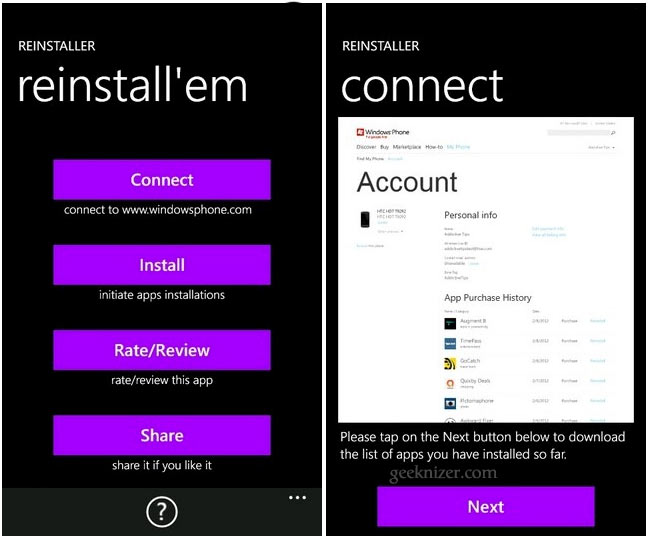
Reinstaller is easy to user, just launch and tap Connect. You are redirected to Microsoft’s app page, where you have to scroll down and tap “Proceed anyway”. Signin with your Windows Live ID and password. When done, Reinstaller will retrieve your app download history. Click next and wait for the app to populate the list of all your downloads.
When listed, click back and install the apps all at once. Choose the apps that you wish to download back.
The app is recommended for ROM modders and even casual users.
Download Reinstaller from Market

Read more: http://geeknizer.com/backup-restore-wp7-deleted-apps-to-account/#ixzz1s7qCG0R2

WPV App Data Backup – Save WP7 App Data & Restore It After Flashing

WPV App Data Backup – Save WP7 App Data & Restore It After Flashing

Windows Phone 7 has just started to come of age and custom ROMs have started to roll out recently. The biggest reason which keeps people from flashing a ROM they really like is the fear of losing all their data during the process. Even if your pictures, music and messages are safe after updating, you will still lose all that progress you made on Angry Birds or all the map data you had cached to your device. Now you don’t need to worry about all that. WPV App Data Backup allows you to save the data of all applications on your device to your computer and restore it later with only a few clicks.


Using the application requires you to follow these steps. But first there are some requirements of course. Windows Phone SDK must be downloaded and installed on your PC and your phone must be developer unlocked. If it’s not, follow our WP7 unlocking guide.
Once all aforementioned requirements are met, connect your device to PC and wait for Zune to start up. Once it has, leave it untouched and run WPV App Data Backup. When the app launches, hit the browse button, choose a destination folder of your choice and click Backup to begin saving your device’s data to the selected directory.
To restore the backed up data, simply connect your device, launch the application and choose Restore.
A pretty useful application if you have an adventurous nature and like to flash a lot of custom ROMs. Beware though, this application will NOT backup your apps, just their data. Some users have reported that the application data restore works properly only after you have run the app for which you want to restore the data once before attempting to restore.
For more information about this application and to find solutions for any problems you might face with the app, you can visit it’s XDA-Developers forum thread.
Download WPV App DATA Backup

sábado, 7 de abril de 2012

How to Manage Stored User Names and Passwords in Vista

Here's How:
 1. Open the Control Panel. (Classic View)
A) Click on the User Accounts icon and click on the Manage your network passwords link in the upper left corner. (See screenshot below)
B) Go to step 3.
user_accounts.jpg
OR

2. Open the Start Menu.
A) In the white line (Start Search) area, copy and paste the command below and press Enter.
NOTE: It will list all of your stored logon names and passwords.
RunDll32.exe keymgr.dll,KRShowKeyMgr
stored.jpg
3. To Add a Stored Password
A) Click on the Add button. (See screenshot above)

B) Type the website or server location in the Log on to box. (See screenshot below)

C) Type your user name and password for this logon.

D) Set whether this is a website or computer you’re logging into and then click on OK.

E) Go to step 8.
add.jpg
4. To Edit a Stored Password
A) Click on a listed location you want to edit to select it, then click on the Edit button. (See screenshot below step 2)

B) Type the new website or server location in the Log on to box. (See screenshot below)

C) Type the new user name and password for this logon.

D) Set whether this is a website or computer you’re logging into and then click on OK.

E) Go to step 8.
edit.jpg
5. To Remove a Stored Password
A) Click on a listed location you want to remove to select it, and click on the Remove button.

B) Click on OK to delete the account. (See screenshot below)

C) Go to step 8.
Name:  Remove.jpg
Views: 48162
Size:  10.4 KB
6. To Backup the Stored Passwords
NOTE: This will backup all of the user logon names and passwords listed.
A) Click on the Backup button. (See screenshot below step 2)

B) Click on Browse and browse to the location you want to save the backup file. (See screenshot below)
backup.jpg
C) Once you browsed to the location where you want to save the backup, give it a name and click on Save. (See screenshot below)
browse.jpg
D) Press Ctrl+Alt+Del on your keyboard to enter a secure location . (See screenshot below)
backup2.jpg
E) Type in a password to give to the backup file and click on Next.
WARNING: Write down this password somewhere safe if you ever want to be able to use it to restore.

F) Click on Finish for the successful prompt.

G) Go to step 8.
7. To Restore Stored Passwords from a Backup
NOTE: This will restore all user logon names and passwords from the backup file in step 6 above to the list.
A) Click on the Restore button. (See screenshot below step 2)

B) Click on Browse and browse to the location of the backup file from step 6B. (See screenshot below)
restore.jpg
C) Once you browsed to the location where you saved the backup, select it and click on Open. (See screenshot below)
browse2.jpg
D) Press Ctrl+Alt+Del to enter a secure location. (See screenshot below)
restore2.jpg
E) Enter the password for the backed up file from step 6E and click on Next.

F) Click on Finish for the successful prompt.
8. Click on Close when done. (See screenshot below step 2)

synchronize contacts from an iPhone into Windows Phone 7

" To be able to synchronize contacts from an iPhone into Windows Phone 7 "

This is a three step move, with several minor details.

Let's begin :

1 - Start by install the iTunes on your PC : 

Next, connect your iPhone to your computer and then wait for it to show up as a device in iTunes.
Once connected, click on the "Info" tab and go down to "Contacts". Select to sync contacts with Outlook and then sync your iPhone.
This operation will copy all contacts from your iPhone (including contact pictures, if you use them) to the Outlook Contacts folder.
Just need to make sure that the contacts were sinchronized to the Outlook.

2 - The next step is to install the Outlook Hotmail Connector, depending on your Windows Version, 32 or 64 bit :


OR


You must restart Outlook and configure a new account, Hotmail, using your Hotmail username and password.
At this point, you are connected to the Hotmail.com service using Outlook, meaning you can send and receive e-mails from Outlook and to synch contacts ;)

3 - You can now start the next step.
In Outlook, scroll to the Contacts of your Usual Mailbox and select all, by pressing CTRL+A and hit CTRL+C.
Scroll to the Contacts inside the Hotmail Mailbox on your Outlook and press CTRL+V.
Outlook will copy all the contacts to the "Cloud". Your Hotmail contacts folder online is the destination.

On your Windows Phone 7 device, click the Right Arrow ( à ) and then choose "Hotmail".
Press the Sync button and that's it.


from: http://blogs.technet.com/b/jribeiro/archive/2010/11/23/moving-contacts-from-iphone-4-to-windows-phone-7.aspx

How to Restore and Backup Windows Phone ( Homebrew )


As of now there is no official solution available in Zune which allows you to backup and restore your Windows Phone ( WP / WP 7.5 Mango )  phone to a state where it was working.  But good thing is because of support from XDA-Forums members,  hx4700 Killer has developed a custom hack which uses the Zune to backup.
Disclaimer : I will not take any gurantee if something happens to your phone, It worked for me and should work for every one else but then we have something called as Luck, So use it at your own risk

How these tools basically works ?

Zune only takes backup when a new update is available.  So in case the update fails, it can use the backup to restore your phone. This custom hack makes Zune think that there is an update available and forces it to take a backup.Same thing happens when it comes to restoring. So everything is getting done by Zune we are just making it think different.
Before using any of these tools make sure you previous update if any is saved. It can be found at C:\Users\<username>\AppData\Local\Microsoft\Windows Phone Update. Whatever is there, copy and paste it anywhere you want.
There are three tools here :
The first two tools skip anything which syncs with Zune i.e. picture, music video etc. The last tool backups everything. So depending on what you want choose wisely.

WP7 Easy Backup Beta by MarcHoover

This tool is a complete solution and very easy to use because it comes with one package. All you need is run the Wp7EasyBackup.exe and choose backup. Download from here
WP7 Easy Backup Beta Files
Backup 
  • When you see Backup Complete on the App Screen as 100%, the backup is done. Wait for the phone to reboot
  • In case t is stuck you will need to pull the battery out.
  • You will also get a message from phone that update was unsuccessful, just ignore it.
  • Go to C:\Users\<username>\AppData\Local\Microsoft\Windows Phone Update and see if you find a folder
  • Then then launch Zune  > Phone Settings > Update and check  if you have option from their to restore
WP7 Easy Backup Beta
Restore :
  • You can very well restore using zune, no hamr done but if you prefer this application, then choose Backup Option.
  • Your phone will reboot and get into update mode and just restore your phone using the last update.

WP7 Update Cab Sender by XBOXMOD-YUKI

This is no fancy UI but does the job nicely. You get command prompt like screen here which will do restore and backup both.
  • Download the file from here, unzip and run WP7 Update Cab Sender.bat file
  • Choose B  Send Cabs to device with Backup
  • Choose R to restore.
Possible that your phone will be stuck for couple of minutes after it says installing update and your phone shows the progress bar is complete. So just wait for few minutes and your phone should reboot automatically.
WP7 Cab Updater Result

Backup Tool by hx4700 Killer

The only reason to create this tutorial is because the thread were the software was released has a lot of confusion on how to configure dll, PKS etc required files. So I have brought them all together and given a clear explanation on how it works and that it WORKS. In case you have questions drop in your questions at this thread.
Advantage of using this tool is that it also backsup your files like music, video synced with zune which makes backup very large.
Download the following Tools  and Files :
  • Windows Phone Support Tools:  32 Bit | 64 Bit 
  • Windows Phone 7 Zune Backup  v1.9 | Link
  • ZuneWmdu.dll 32 Bit | 64 Bit
  • PKS File :  Download
  • updateWP.exe : Download ( extract to find the file ) and use it if it is not there in your computer.
  • It is suggested to use Zune 4.7 version with this. Though I did everything with 4.8 and it was of no issue.
Video Demo : ( Watch on YouTube )


Setting up 
  • First Install the Windows Phone Support Tools.
  • Next extract rest of the files in a folder, Call it as WP Backup Tools.
  • In the same Folder create another folder called as Archive.
Windows Phone Backup Tools
How to Backup using this tool
  • By Default Zune Backups are stored at %LOCALAPPDATA%\Microsoft\Windows Phone Update. So visit that first and copy whatever is there to somewhere. In case something goes wrong we will bring it back.
  • Launch the Windows Phone 7 Zune Backup tools
  • Uncheck option which says use the default PKS file.
  • Click on Path Settings and set paths for PKS File Location, Archive Folder Location, And ZuneWmdu.dll 4.7 Path by browsing to locations which we did in Step 1.
Setting up File Path in Backup Tool
  • Next Connect your Windows Phone and then click on Backup Phone.
  • This will then restart the phone and you would get to see the same picture on the phone which you see in regular update. Basically this app makes Zune feel like there is an update and makes it to take a backup.
Bacup Windows Phone
  • Once backup is complete, you need to unplug your phone from USB cable. Also on your phone the progress bar will be full. In case it does not reboot itself, shut it down manually and start again. In case you get warning message which says backup was not complete ignore it.
Complete Baclup Info
  • Now if you go to %LOCALAPPDATA%\Microsoft\Windows Phone Update you will see you have a folder  with name as Restore Point, get inside and you will have a folder with number. Check the size of it, if it matches with the total space occupied in Zune, you are done.
Backup File with Size
Manage Backup :
This tool also comes along with a Management tool which allows you to move your archived files to a set location which you have already done.
You can click on Archive Current Back to move from the default backup location to choice of yours and you can also move an archived backup to default location.
Windows 7 Restore Archived Backip to Default location

Restoring your Windows Phone
Now there are two ways here. Either you can restore your phone using this same tool or you can launch Zune and under update you can see that a restore point is available. However this tool lets you backup any number of such restore points which is a very big advantage. So what I did was tried both the methods and they worked nicely. I had to reset twice but that’s another story.
Restore Point in Zune
One thing to remember here is that Zune will be of no use if you hard reset your phone and then try to recover your phone. It can only be useful if you want to restore some big size apps or restore yourself to certain period because when you do a hard reset, the Zune will forget you.
But using this custom backup tool, you can recover a phone which has gone through a hard reset. So if you are kind of person who needs to switch between two live id, this is the tool for you if you can spend 30 minutes for this.
Done this your phone will be in same state as it was before. All your apps, email configuration, wi-fi connections etc will be as it is.

Restore using Cutom Tool without Zune 

http://www.wpxbox.com/how-to-restore-and-backup-windows-phone-homebrew/

terça-feira, 3 de abril de 2012

Smart fabric for new soldier uniform

Smart fabric for new soldier uniform

Intelligent Textiles uniform Crown Copyright The advanced uniform could see use by the end of the year

Related Stories

British soldiers' uniforms could soon use electrically conducting yarn woven directly into the clothing, replacing cumbersome batteries and cabling.
The "e-textiles" could provide uniforms with a single, central power source.
This would allow soldiers to recharge one battery instead of many and cut the number of cables required in their kit.
Surrey-based Intelligent Textiles showcased the lightweight uniform at an event organised by the Centre for Defence Enterprise (CDE).
The company has patented a number of techniques for weaving complex conductive fabrics.
"We have built-in conductive yarns that then take power and data to where it needs to be," Asha Thompson, director of Intelligent Textiles, told BBC News.
"One of the problems with conventional cables is that breakages can be catastrophic. What we do here is build in redundancy, so that if the fabric gets cut, damaged or torn, we still have a way of re-routing the data."
The company has received £234,000 from the CDE, which wants to find solutions for reducing the physical and the "cognitive" burden placed on soldiers.
Currently, separate batteries may be required for each piece of a soldier's equipment, which adds to their carrying load as well as being costly. This is one reason why a centralised battery pack is so desirable.
In addition, it removes the hindrance of the many wires and cables required in military equipment. These can add weight and can tangle and snag.
Soldiers would also be able to recharge or replace one battery instead of many.
Field trials "We've got the fabric integrated into the vest, into the shirt, into the helmet, the backpack, and into the glove and weapons platform," said Ms Thompson.
Fusilier on exercise MOD The new uniform could reduce the current physical burden for soldiers
"We have a ringmain that allows us to power data wherever we want it to go. We can send power up to the helmet without it being tethered."
The "plug-and-play" connectors used in the current uniform prototype are for demonstration and are unlikely to be the ones used in a finished product.
This is partly because they have not been environmentally-proofed to stop them rusting or short-circuiting, and also because they will need to work with older equipment still used by armed forces.
Also being developed is a fabric keyboard for use with a portable computer that will be integrated with the uniform.
The company is planning to carry out field trials in May and the system could see some limited use by the end of the year. But it is likely to be 2014 or 2015 before the lightweight uniforms see more widespread use.
The company is currently working with BAE Systems to integrate other next-generation equipment into the uniform.
The Centre for Defence Enterprise was set up to provide a new process for harnessing innovative ideas with potential defence or security applications. It calls for research proposals from academia and companies for ideas that are high-risk but which may also have great benefits.
The organisation is based at the Harwell science campus in Oxfordshire and is part of the Defence Science and Technology Laboratory (DSTL).
Paul.Rincon-INTERNET@bbc.co.uk

Pub